Connect Claude
Add Solved Tax & Legal in Claude, sign in and ask your first question.
Before you start
You need:
A Solved account with at least one area of law. New to Solved? Start a free trial: 14 days free, cancel anytime. If your team already uses Solved, sign in and choose your areas.
A Claude account on any plan.
Connect Claude
Open Solved in Claude
Claude’s connector directory opens at Solved Tax & Legal. Select Connect.
Sign in to Solved
Sign in with your Solved account.
Allow the connection
Solved shows which account Claude will use. If it isn’t the one you want, select Use a different account first. Then select Connect. Claude opens again and shows Solved Tax & Legal as connected.
Try your first question
Start a new conversation and paste this question.
Use Solved to find the HMRC manual section about group relief. Open the section and give me its title, reference and source link.
The first time, Claude asks before it uses Solved: once to search and once to read a source. Select Always allow so it doesn't ask every time.
Check it worked
- You can see that Claude used Solved while answering.
- The answer includes a link to the source it read.
- The link opens that section in Solved.
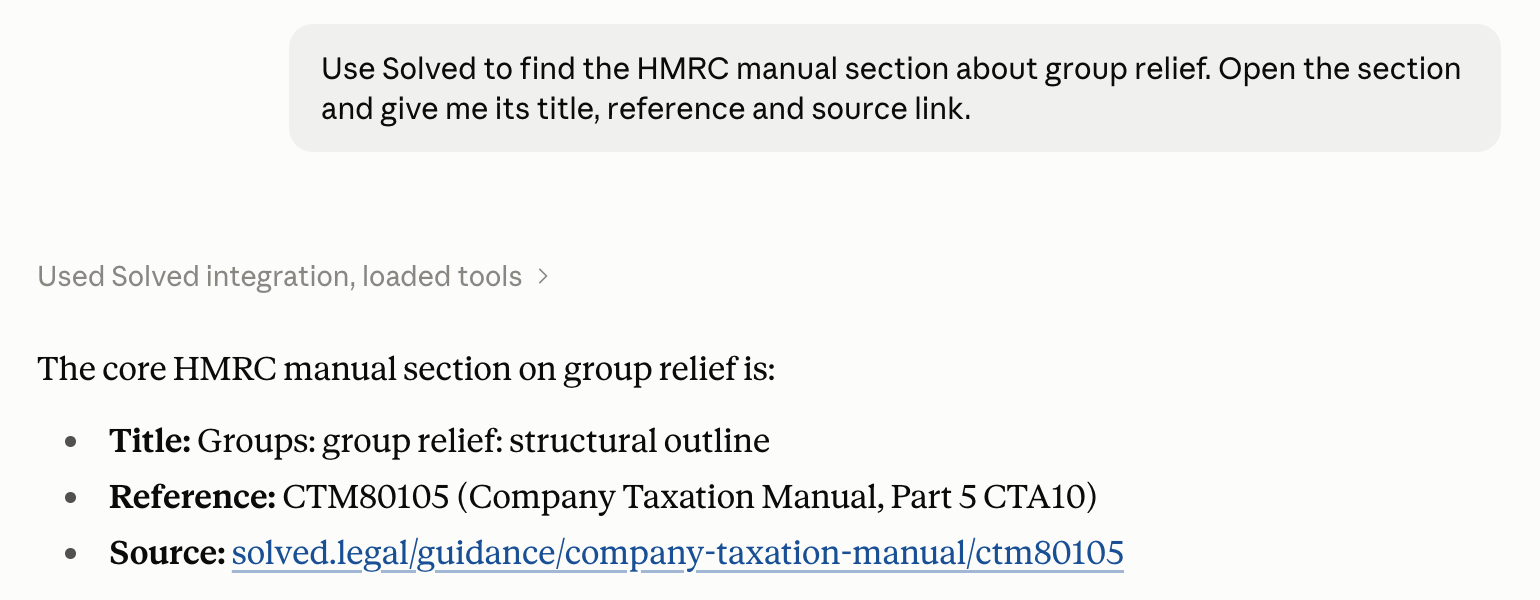
If the answer has no source link, Claude probably answered from its own knowledge. Check that Solved is connected, then ask again and mention Solved in your question.
For admins
Solved Tax & Legal is listed in Claude, so there is nothing to register or configure. An Owner turns Solved on for your organisation once.
Open Connectors in Claude
In Claude, go to Organization settings › Connectors and select Browse connectors. You need the Owner role.
Add Solved to your team
Find Solved Tax & Legal and select Add to your team.
Tell your team
Everyone then follows Connect Claude above and signs in with their own Solved account.
Having trouble?
Solved hasn’t been turned on for your organisation yet. Send your admin the steps for admins.
Select + › Connectors in the conversation and check Solved Tax & Legal is turned on. Then ask again and mention Solved in your question.
Go to Customize › Connectors, select Solved Tax & Legal and set Read-only tools to Always allow. Reporting feedback to Solved still asks first.
Go to Customize › Connectors, select Solved Tax & Legal and choose Disconnect.
If Solved shows No agent access yet after you sign in, the account you signed in with has no areas of law yet.
Select Continue on Solved to start a free trial, or to choose your areas if your team already uses Solved, then connect again. If you meant to use another account, select Sign in with a different account.
Claude’s menus can change. See Claude’s guide to connectors for the latest steps.